Is the Nelko label maker actually worth it?
Worth it, if you're fine designing from your phone
Why the label always ends up handwritten
You're on your third identical charging cable this month, hand deep in a drawer, no way to tell which one goes where. A label maker is a five minute fix for a five year problem, if you actually reach for it. The doubt with the Nelko label maker is whether it's simple enough to become one of those tools, or another gadget that ends up in a drawer of its own.
How the Nelko P21 label maker actually works
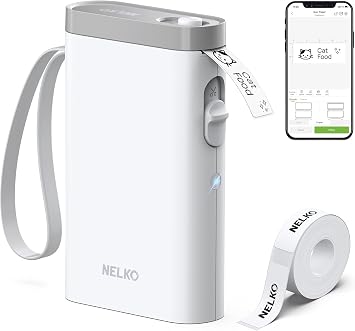
The trick that makes this work is thermal printing, the same technology behind a receipt at checkout. There's no ink cartridge to run dry and no ribbon to replace: the printhead heats tiny dots on the surface of the Nelko label maker tape, and the heat itself darkens the marks into letters. That's the whole mechanism, and it explains most of what you'll notice day to day. Because there's nothing to refill, the P21 stays small, eleven and a half ounces, light enough to live in a bag rather than claim a shelf. Connection runs over Bluetooth rather than a cable, which means the design work happens on your phone, in an app with templates for shelves, folders, cables and jars already built in, instead of on a tiny built-in keypad you'd be thumbing through one letter at a time. That trade, a phone screen for a physical keypad, is really the whole personality of the device: everything that would normally be a button on the machine is instead a screen you already know how to use. The cost of that convenience is that the label maker does nothing on its own; without your phone nearby it's an inert plastic box. The benefit is that fonts, icons and label length adjust as easily as typing a text, and a template you build once is one tap away next time. For anyone labeling in short bursts, a handful here, a handful there, that's a better trade than a machine with more buttons and less software behind it.
So you're not really buying a label printer, you're buying a shortcut from a thought in your head to an adhesive strip in your hand, using a phone you already carry everywhere. If the app is where you're comfortable working, that shortcut is worth it. If you'd rather stand at a machine with its own keypad and watch the label build in front of you, this isn't that tool.
Who the Nelko label maker is for, and who should skip it
Worth it if
- you're comfortable designing labels on your phone instead of a built-in keypad
- you want a label maker with no ink or cartridges to replace
- you label in short bursts, shelves, jars, cables, rather than long batch runs
- you want something small enough to live in a drawer
Skip it if
- you print long label runs regularly
- you'd rather not add another app to your phone
- you want a device with its own screen and keypad
If you print long batches or want a machine with its own keypad and display, this isn't built for that.
The Nelko label maker verdict, is it worth it
So if you're organizing a kitchen, an office drawer or a stack of cables and you don't mind composing labels on a screen, this is a quiet yes, it earns a spot in the drawer instead of collecting dust in it. If you print in long runs, need a device with its own display, or don't want another app on your phone, skip it. The honest boundary here is the phone dependency, not the print quality.
Picture the first ten minutes: cables labeled, jars labeled, the folder on your desk finally saying what's inside it instead of nothing. That's the whole payoff, a small visible order that used to take a marker and never looked this clean. Tens of thousands of ratings on this one settle on the same theme, that it does this small job cleanly without fuss. You're not committing to a system, just trying the shortcut once.
Amazon shoppers rate it 4 out of 5 across 23,524 ratings. That is their number, not ours.
Before you go
Do Nelko label makers require special ink or cartridges?
No, the Nelko P21 uses thermal printing, so it prints by heating the label tape directly and never needs ink, toner or a cartridge.
How to connect nelko label maker?
It pairs over Bluetooth with the Nelko app on your phone, where you design the label before sending it to print.
Is the Nelko app free?
Yes, the companion app is free to download and use for designing and printing labels.
Who makes Nelko label maker?
Nelko is the brand behind the P21 and its other label printer models, sold primarily through Amazon.
Are Nelko label printers good?
Yes, for simple home and office labeling from a phone. Not built for high volume industrial printing.
By the numbers
earn an unconditional yes at full priceOut of 52 office products we have reviewed. This one is a yes with a condition attached.
Verdict datasetQuestion indexCC BY 4.0
Full spec sheet
| Brand | Nelko |
|---|---|
| Connectivity Technology | Bluetooth |
| Printing Technology | Thermal |
| Color | White |
| Model Name | P21 |
| Printer Output | Monochrome |
| Max Printspeed Monochrome | 30 |
| Item Weight | 11.52 ounces |
Keep comparing


More office reviews.