Is the Anker USB-C hub for MacBook still worth it?
Worth it, if your setup is simple
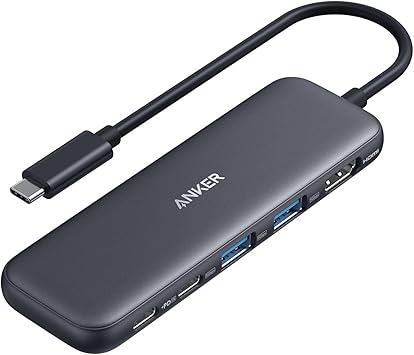
Why one laptop port never seems like enough
You've got one USB-C port on the laptop and three things that need to happen at once: a monitor, a charger, and whatever's sitting on an external drive. You plug in a cheap dongle and watch the screen flicker, or the charging light stay dark, or the transfer stall out. That's the moment an anker usb-c hub for macbook is supposed to fix, and the question is whether a twenty dollar hub actually fixes it or just moves the problem.
How the anker usb-c hub splits its five ports
Here's where your money actually goes on this one. Instead of building one smart port that juggles video, data, and power, Anker split the jobs across five physically separate ports, each wired to do exactly one thing. The HDMI port has its own dedicated line to the display, which is why it tops out at 4K@30Hz rather than the 60Hz you'd get on a pricier dock, since it isn't sharing bandwidth with anything else. The USB-C data port pushes files at 5Gbps but carries zero video signal. The 100W PD-in port only accepts a charger, no headphones, no external drive, nothing with data on it. That's the honest trade: nothing on this hub fights over resources, but nothing on it is flexible either. Plug a monitor into the wrong port and you'll get nothing, not a slower version of something. The upside of that rigidity is predictability. Once you know which port does which job, the hub just works the same way every time, and the 85W pass-through means your laptop keeps charging while all four other ports stay live. The catch is that pass-through needs a charger you already own; Anker doesn't put one in the box.
You're not buying a flexible port, you're buying five dedicated lanes that don't step on each other. That's fine, even good, if your day is one monitor and one charger. It's the wrong tool if you were hoping for a real docking station with high refresh video or multiple displays.
Who this hub actually suits
Worth it if
- You run one external display and one charger from the same laptop port
- You want predictable pass-through charging without a separate power brick swap
- You occasionally move files off a USB-A or USB-C drive
- You already own a compatible charger for the 85W pass-through
Skip it if
- You need 4K at 60Hz for video or design work
- You run two external monitors
- You're on Linux
- You wanted the PD-in port to double as a data port
Skip it if you need dual monitors, 4K at 60Hz, or Linux compatibility.
The anker usb-c hub for macbook verdict
If you run a single external monitor, charge through the same cable, and occasionally move files off a drive, this is a quiet yes at the price. If you need 4K at 60Hz, a second display, or Linux support, spend more somewhere else.
The itch this solves is the daily dongle shuffle: you plug in once, the monitor lights up, the laptop keeps charging, and a drive shows up in Finder without you thinking about it again. With over 18,000 ratings behind it, the pattern that stands out is buyers using it for exactly that simple docked setup and not asking it to do more. That's the version of day one worth picturing before you click buy.
Amazon shoppers rate it 4 out of 5 across 18,401 ratings. That is their number, not ours.
Before you go
Are Anker USB-C hubs good?
Yes, this one is dependable for basic docking, with a 4K HDMI port, two 5Gbps USB-A ports, and pass-through charging, though the display caps at 30Hz.
Is Anker a good docking station?
Yes, for a single-display setup with charging and file transfer, but this model isn't a full multi-monitor dock.
Which Anker USB hub is best?
No single Anker hub fits every setup; this 5-in-1 model is built for one monitor and one charger, not multi-display work.
By the numbers
computers products reviewedThis one is a yes with a condition attached.
Verdict datasetQuestion indexCC BY 4.0
Full spec sheet
| Brand | Anker |
|---|---|
| Color | Black |
| Hardware Interface | HDMI, USB 3.0, USB Type C |
| Special Feature | Fast Charging, Pass Through Charge |
Keep comparing


More computers reviews.