Is the Anker Nano Power Strip worth it for your desk?
Worth it, if your desk edge fits the clamp
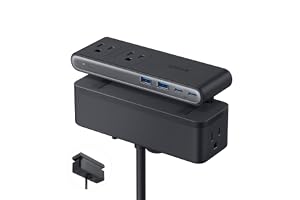
The mess under every desk
You've been on your knees under a desk, flashlight in your teeth, hunting for one free outlet among four bricks and a surge strip from 2015. The anker nano power strip promises to end that specific indignity by clamping to the desk edge instead of hiding on the floor. Whether it actually fits your desk is the whole question.
How the anker nano power strip's clamp and GaN charging work
Here's where your money actually goes: not into the outlets, which are commodity parts, but into the clamp and the GaN chip. The clamp is a spring bracket rated for edges between 0.6 and 1.8 inches, flat, not curved, not sloped past 45 degrees. That range is narrower than it sounds. Most desks clear it; glass desks with rounded lips and some standing-desk edges don't. Get the fit right and the whole strip disappears under the desk, outlets facing up through a dual-zone layout: six AC sockets on one tier, four USB ports (two C, two A) on the other, so a charging brick and a lamp cord don't fight for the same six inches of plastic. The other quiet upgrade is the 70W USB-C port. Gallium nitride transistors run cooler and smaller than the silicon in older bricks, which is how Anker fits laptop-charging wattage into a strip this compact without a separate power brick. That's the trade: one cable doing what used to take a laptop charger plus a phone charger plus a fan for the heat. The catch applies to every USB-C laptop claim, your laptop's own charging ceiling decides whether 70W is enough or just close enough.
So the honest trade is this: you're not buying ten ports, you're buying back the desk surface those ports used to occupy, and the price of that is a fairly strict clamp spec. If your desk clears it, the rest is just convenient plumbing.
Who the anker nano power strip actually fits
Worth it if
- your desk edge measures between 0.6 and 1.8 inches and is flat
- you want a laptop or tablet charging over USB-C without a separate brick
- you're tired of a power strip taking up desk or floor space
Skip it if
- your desk has a curved, glass, or sloped edge over 45 degrees
- you have no clampable edge at all, like a wall-mounted or built-in desk
- you only need basic AC outlets and don't care about USB-C charging
Not for curved, glass-lipped, or sloped desk edges the clamp can't grip.
The anker nano power strip verdict: worth it or overhyped
If your desk edge is flat and somewhere between 0.6 and 1.8 inches, this is a quiet yes, especially if you're charging a laptop over USB-C anyway. If your desk has a curved lip, a glass edge, or no edge to clamp at all, skip it, no strip fixes a desk it can't grip.
Picture the actual day one: you clamp it once, run the cables up through the back, and the desktop clears out for good, no more surge strip snaking across the floor to trip over. That's the problem this removes, permanently, not just for the first week. Just measure your desk edge before you order rather than after, that's the only step that decides whether this is a five-minute install or a return label.
Amazon shoppers rate it 4 out of 5 across 418 ratings. That is their number, not ours.
Before you go
Will the Anker Nano Power Strip clamp fit my desk?
Yes, if your desk edge is between 0.6 and 1.8 inches thick, flat, and not sloped more than 45 degrees; curved or thicker edges won't clamp securely.
Can it charge a laptop at full speed?
Yes, the USB-C port delivers up to 70W using GaN tech, enough for most USB-C laptops, though your laptop's own charging spec sets the real ceiling.
By the numbers
earn an unconditional yes at full priceOut of 109 electronics products we have reviewed. This one is a yes with a condition attached.
Verdict datasetQuestion indexCC BY 4.0
Full spec sheet
| Brand | Anker |
|---|---|
| Color | Black |
| Total Power Outlets | 10 |
| Voltage | 240 volts |
| Special Feature | Surge Protection |
Keep comparing


More electronics reviews.