Why smartphones frustrate some seniors
You've watched someone stab at a smartphone screen five times before a call actually dials, thumb sliding off the glass, patience going with it, while you stand there wondering if there's a phone that just works without a tutorial first. That's the gap the Lively Jitterbug Flip2 is built to fill, and the gap is the whole product.
How the Lively Jitterbug Flip2 actually works
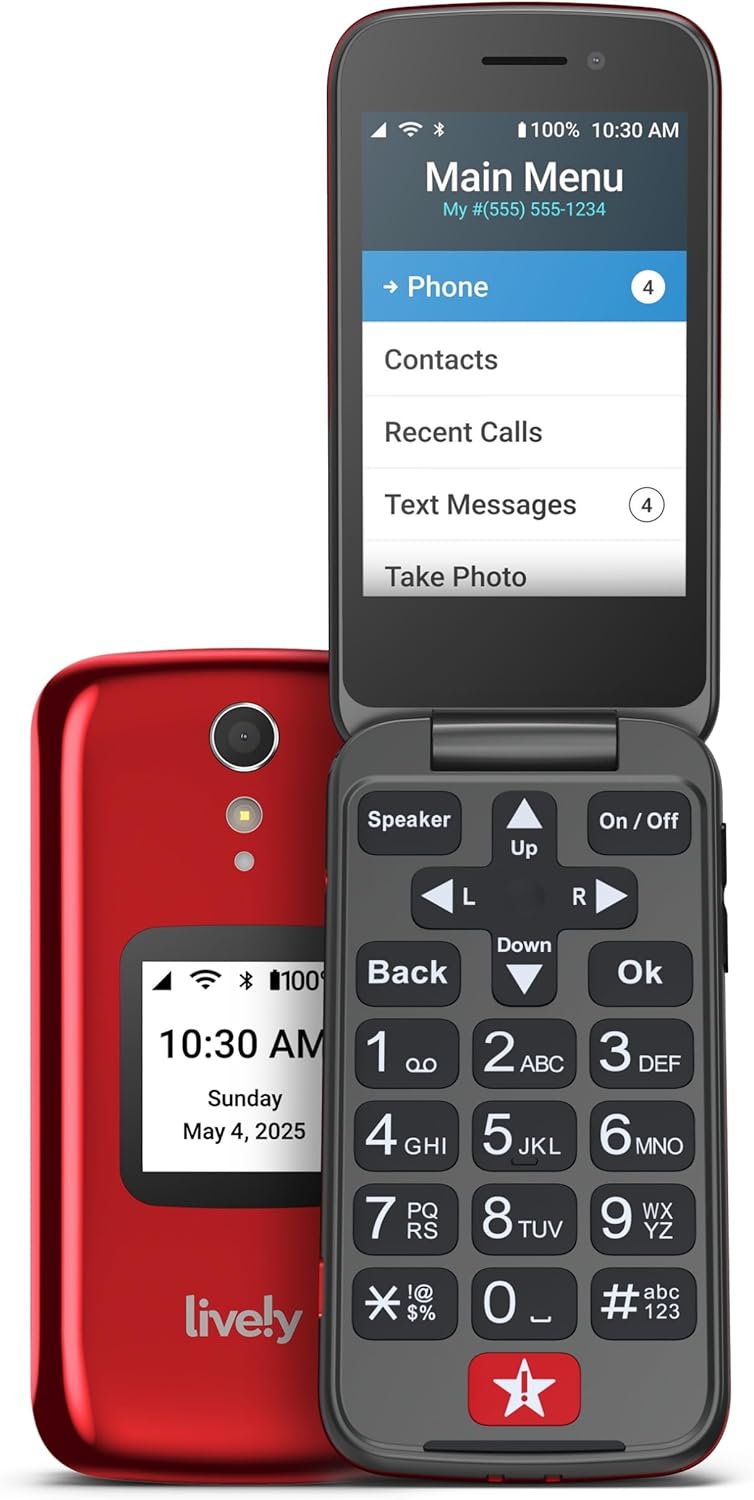
Here's where your money actually goes: not into the flip phone, which is a modest piece of hardware doing very little work, but into the service contract underneath it. The Flip2 ships with an eSIM built in and locked to Lively's own phone service, so there's no SIM tray, no carrier shopping, no compatibility puzzle at setup. That's a real trade, not a bug. Because the hardware and the network are sold as one unit, Lively can guarantee that the high contrast screen, the big buttons and the physical help key on the keypad all talk to the same support line, staffed by people, 24/7. Press that key and a human answers, not a menu tree. The marketing skips this part, but the phone itself is basically a terminal for that support relationship. Simple menus and one-touch speed dial exist because the design brief was never make someone relearn a phone, not build a phone with an app store. Add the optional Urgent Response service and that same help button becomes a direct line to emergency assistance, which is the actual reason families choose this over a cheap prepaid flip phone with nobody on the other end. The catch is the same thing that makes it work: swap carriers and the phone is dead weight in a drawer. That's the honest trade for the simplicity.
So you're not really buying a flip phone, you're buying a support contract that happens to come with a keypad attached, and the sticker price is a rounding error next to the monthly plan that makes it function. Judge it as a service with a phone, not a phone with a service, and the decision gets a lot clearer.
Who the Jitterbug Flip2 is for, and who should skip it
Worth it if
- you want a phone that just dials and texts without a learning curve
- you value a 24/7 human help line more than app features
- the household is fine committing fully to Lively's own network plan
- the physical help key matters more than internet access
Skip it if
- you want to keep your current carrier or SIM
- the person already handles a smartphone without trouble
- you need internet browsing or apps on the phone
Not for someone who already manages a smartphone comfortably or wants to keep their current carrier.
Is the Lively Jitterbug Flip2 worth it
If you're setting this up for someone who wants a phone that dials on the first press and has a button that reaches an actual person, this is a quiet yes. If the person already manages a smartphone fine, or you were hoping to keep your existing carrier, skip it, because the lock-in isn't an oversight, it's the entire design.
The problem this solves is the five-minute standoff with a screen nobody asked for, replaced by a phone that dials on the first press and has a key that reaches a real person instead of a phone tree. Day one looks like handing it over already charged, pointing out the help button, and being done. A large number of buyers rate it well for exactly that simplicity, though the same network lock-in that makes it easy is also what frustrates the households expecting it to flex like a regular carrier phone.
Amazon shoppers rate it 4 out of 5 across 4,125 ratings. That is their number, not ours.
Before you go
What is the downside to the Jitterbug phone?
It only works on Lively's own network, so there's no carrier flexibility, and some households find the menus still take a little learning despite the simplified design.
Does Lively Jitterbug Flip 2 have internet?
No, it's built for calls and texts only, not browsing or apps.
What network does Jitterbug Flip2 use?
It runs exclusively on Lively's own phone service through a built-in eSIM, and it isn't compatible with other carriers.
Can you text with a Jitterbug Flip2?
Yes, texting is part of the flexible talk and text plans Lively offers with the phone.
What is the easiest flip phone for seniors to use?
Phones with high contrast screens, physical buttons and a dedicated help key, which is exactly the combination the Flip2 is designed around.
By the numbers
phones & accessories products reviewedThis one is a yes with a condition attached.
Verdict datasetQuestion indexCC BY 4.0
Full spec sheet
| Operating System | Lively Proprietary |
|---|---|
| RAM Memory Installed | 2 GB |
| Processor Series | Snapdragon |
| Processor Speed | 1.1 GHz |
| Memory Storage Capacity | 16 GB |
| Color | Flip2 Red |
| SIM Card Slot Count | E Sim |
| Connector Type | USB Type C |


