Is the JADENS Thermal Label Printer Worth It?
Worth it, if shipping is a regular part of your week

Picture printing your tenth shipping label of the day on a regular inkjet: the fanfold paper jams halfway through, the ink cartridge you replaced last month is already streaking, and you're stuck trimming the edges with scissors so the thing fits the label sleeve. That five-minute chore, repeated daily, is the actual cost of shipping small packages yourself. The real question with a jadens thermal label printer isn't whether it prints, it's whether that dedicated box is worth the counter space.
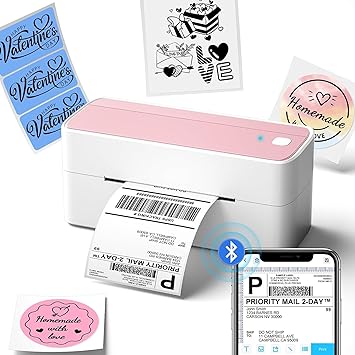
Here's the part that changes your day: thermal printers don't put anything onto the paper, they burn it. The label stock is coated with a heat-sensitive layer, and the printer's thermal head heats specific points on that coating as the roll or fanfold sheet feeds through, darkening exactly the pixels it needs at 203 DPI. That's the whole trick: no ink cartridge, no toner drum, nothing to run dry mid-batch, and none of the ink rollers or cartridge carriages that jam a regular printer. Connection is built to be flexible: plug in over USB on Windows or Mac, or go wireless over Bluetooth from a laptop; from a phone, the JADENS app handles it since neither Android nor iOS pairs thermal printers over Bluetooth directly. It reads label widths from 1.57 to 4.1 inches, which covers the fanfold stacks and roll formats that ShipStation, Shopify, Etsy, eBay, and Amazon's own label tool all generate. Once it's calibrated to your label size, the only ongoing task is loading more paper.
So you're not really buying a printer, you're buying your way out of the ink aisle and the jam clearing, for one repetitive job. If you print more than a handful of labels a week, that trade pays for itself in saved time alone, no toner run required.
Worth it if
- You ship packages weekly through platforms like Shopify, Etsy, eBay, or Amazon
- You're tired of replacing ink or toner just to print shipping labels
- You want one machine that stays calibrated to a single label size
Skip it if
- You ship only a handful of packages a year
- You need color printing or graphics on labels
- You don't want to manage a second dedicated device
Not for occasional shippers who mail a package a few times a year, or anyone who needs color labels.
If you run an online shop and ship packages regularly, this is a quiet yes, it earns its spot next to the packing tape. If you mail something every few months, a copy shop label or your regular printer will cost you less hassle than owning a dedicated machine.
Amazon shoppers rate it 4 out of 5 across 9,160 ratings. That is their number, not ours.
Before you go
Does JADENS label printer need ink?
No, it's a thermal printer, so it burns the image directly onto heat-sensitive label paper with no ink or toner involved.
What apps does JADENS thermal printer use?
For Android and iOS you print through the JADENS printer app, since phones can't connect to thermal printers over Bluetooth directly; Windows and Mac can print via USB or Bluetooth without an app.
Is JADENS a good thermal printer?
For small business shipping through platforms like ShipStation, Shopify, or Amazon, it covers the common label sizes and connection types you'd need without ongoing ink costs.
By the numbers
earn an unconditional yes at full priceOut of 52 office products we have reviewed. This one is a yes with a condition attached.
Verdict datasetQuestion indexCC BY 4.0
Full spec sheet
| Brand | JADENS |
|---|---|
| Connectivity Technology | Bluetooth |
| Printing Technology | Thermal |
| Special Feature | Bluetooth,Wireless |
| Color | Blue |
| Model Name | JD268BT |
| Printer Output | Monochrome |
| Max Printspeed Monochrome | 72 |
Keep comparing



More office reviews.